AI ToolsProcess note
Suno AI Masterclass Part 1: The Complete Beginner's Guide
Learn the fundamentals of Suno AI music generation. This comprehensive guide covers account setup, interface navigation, automatic vs custom modes, and how to write effective prompts for better results.
5 min read
Suno AI Masterclass Part 1: The Complete Beginner's Guide
Welcome to the first installment of the Suno AI Masterclass series. Whether you're a complete beginner or looking to sharpen your AI music skills, this comprehensive guide will take you from zero to creating compelling AI-generated tracks.
What You'll Learn in This Series
This three-part masterclass covers:
- Part 1 (This Article): Foundation - Setup, interface, and basic prompt engineering
- Part 2: Advanced Techniques - Custom mode, lyrics writing, and style refinement
- Part 3: Professional Workflow - Exporting, editing in FL Studio, and mixing AI tracks
By the end of this series, you'll have a complete workflow for creating professional-quality music using Suno AI as your creative partner.
Understanding Suno AI
What Is Suno AI?
Suno AI is a text-to-music AI tool that generates complete songs from written descriptions. Unlike earlier AI music tools that only created instrumental loops, Suno can produce:
- Full instrumental tracks with multiple elements
- Vocals with lyrics in various styles
- Complete song structures (intro, verse, chorus, bridge, outro)
- Professional-quality audio at 44.1kHz
Why Suno Changed Everything
Before Suno, AI music generation was limited to:
- Short instrumental loops (10-30 seconds)
- No vocal capabilities
- Generic, repetitive outputs
- Difficult to extend or arrange
Suno's breakthrough is generating coherent, full-length songs with vocals that actually make musical sense. This opens up new possibilities for producers, songwriters, and content creators.
Getting Started
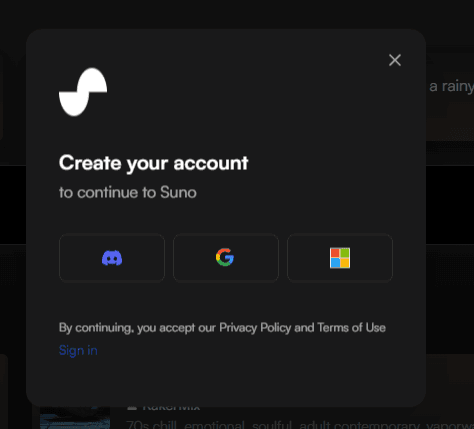
Step 1: Create Your Account
- Visit suno.com
- Click "Sign Up" in the top right
- Choose your preferred method:
- Discord: Great if you already use Discord
- Google: Quick one-click signup
- Microsoft: For Microsoft ecosystem users
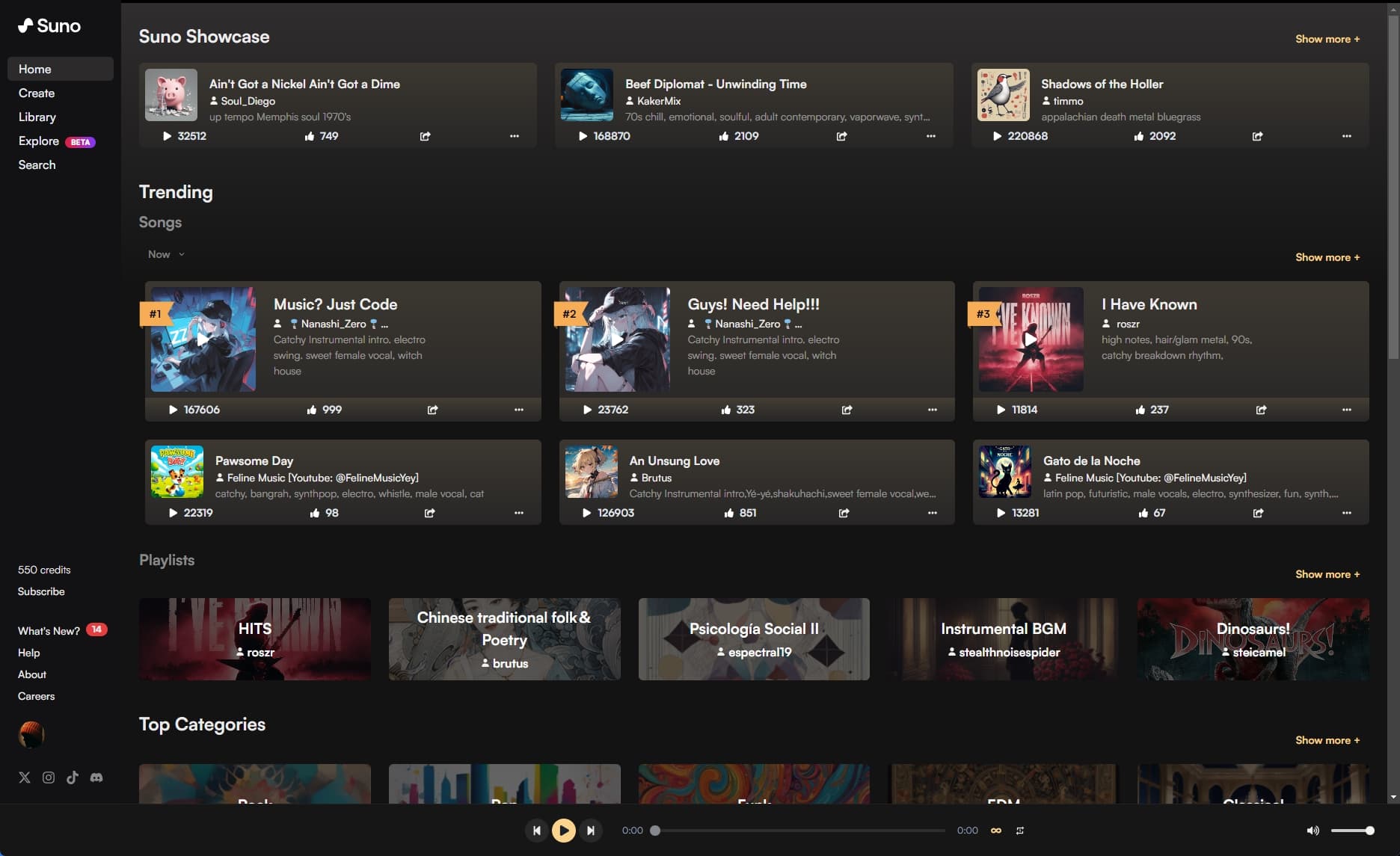
Step 2: Understanding the Dashboard
Once logged in, you'll see:
Left Sidebar:
- Create: Start a new song
- Library: Your generated songs
- Explore: Community creations
- Settings: Account preferences
Main Area:
- Recent creations
- Prompt input box
- Generation history
Step 3: Your First Generation
Let's create your first AI song:
- Click the "Create" button
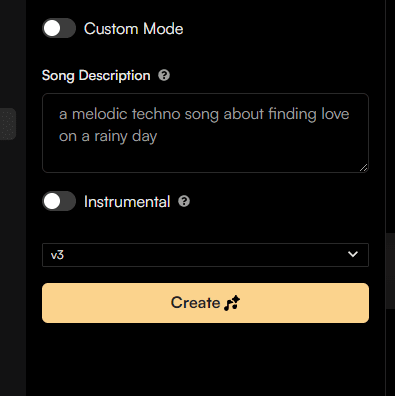
- You'll see two options: Automatic and Custom
Automatic Mode (Recommended for Beginners)
In the description box, type:
Upbeat electronic dance track with energetic synths,
punchy drums, and a driving bassline.
Perfect for a workout playlist.
Click Create and Suno will generate two variations (v1 and v2).
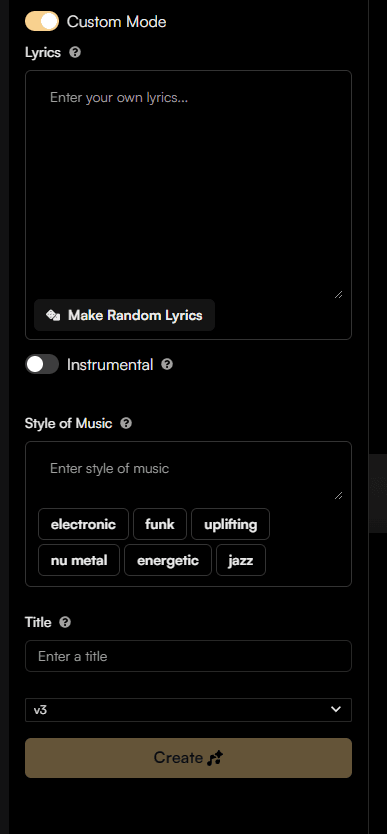
Custom Mode (More Control)
Click "Custom Mode" to access:
- Lyrics: Write or paste your own lyrics
- Style of Music: Detailed genre description
- Title: Name your track
Writing Effective Prompts
The key to great results is learning prompt engineering. Here's how to write prompts that get results:
The Prompt Formula
A great Suno prompt includes:
[Genre/Style] + [Mood/Emotion] + [Instrumentation] + [Tempo/Energy] + [Specific Elements]Example:
Melodic progressive house track, euphoric and uplifting,
featuring piano chords, soaring synth leads, and a driving kick drum.
130 BPM, festival anthem energy, with a breakdown that builds tension
and a powerful drop.
Genre Keywords That Work
Electronic/Dance:
- House, Techno, Trance, Dubstep, Drum and Bass
- Progressive House, Deep House, Future Bass
- EDM, Electro, Synthwave
Pop:
- Synth-pop, Electro-pop, Indie Pop
- Dance-pop, Alternative Pop
Other Styles:
- Cinematic, Orchestral, Ambient
- Acoustic, Folk, Rock, Hip-hop
- R&B, Jazz, Classical
Mood and Atmosphere
Add emotional descriptors:
- Energy: Energetic, calm, driving, relaxed
- Emotion: Melancholic, euphoric, dark, hopeful
- Vibe: Atmospheric, intimate, epic, mysterious
Instrumentation Tips
Be specific about instruments:
- "Punchy kick drum and snappy snare"
- "Warm analog synthesizers"
- "Layered vocal harmonies"
- "Acoustic guitar fingerpicking"
Understanding the Results
What to Expect
Each generation creates:
- Two variations (v1 and v2)
- Approximately 2 minutes of music
- MP3 format at 44.1kHz
Evaluating Your Results
Ask yourself:
- Does it match my description?
- Is the quality acceptable?
- Can I work with this as a starting point?
Remember: Suno is a starting point, not a final product. Expect to edit and refine.
When to Regenerate
Regenerate when:
- The style is completely wrong
- The vocals don't match the genre
- The energy level is off
- Something sounds "off" musically
When to Continue
Work with the result when:
- It's 70-80% what you wanted
- The core idea is good but needs refinement
- You can edit it in your DAW
Common Beginner Mistakes
1. Vague Prompts
❌ Bad: "Make a good song" ✅ Good: "Uplifting melodic house track with piano chords, 128 BPM, festival energy"
2. Overly Complex Prompts
❌ Bad: "Progressive house mixed with jazz fusion, metal drums, country vocals, and orchestral strings at 150 BPM with a reggae breakdown" ✅ Good: "Progressive house track with jazzy chord progressions and live drum energy"
3. Ignoring Genre Conventions
Each genre has conventions. Research what makes a genre sound like that genre, then describe those elements.
4. Expecting Perfection
AI-generated music rarely comes out perfect. Expect to generate multiple versions and edit the best one.
Your First Week Practice Plan
Day 1-2: Exploration
- Generate 10 songs with different genres
- Experiment with prompt styles
- Save favorites to your library
Day 3-4: Prompt Engineering
- Try the formula: Genre + Mood + Instruments + Energy
- Compare results between vague and specific prompts
- Build a list of "power words" that work
Day 5-6: Style Matching
- Pick 3 reference tracks you love
- Write prompts to match those styles
- Compare your results to the originals
Day 7: Review and Reflect
- Listen to all your generations
- Note what worked and what didn't
- Refine your prompt-writing skills
Next Steps
Ready to dive deeper? Part 2 of this masterclass covers:
- Custom Mode mastery: Writing lyrics and detailed style descriptions
- Vocal techniques: Getting better vocal results
- Advanced prompting: Structure, arrangement hints, and style blending
- Troubleshooting: Fixing common problems
Continue to Part 2: Advanced Techniques →
Download the Checklist
Want to make sure you're following best practices? Download my Music Production Checklist to ensure your AI-generated tracks meet professional standards.
Questions?
Have questions about getting started with Suno? Drop a comment below or reach out on social media:
Happy producing!
Questions / Answers
Frequently asked questions
What is Suno AI and how does it work?
Suno AI is an artificial intelligence music generator that creates complete songs from text prompts — including vocals, instruments, and production. You describe what you want (genre, mood, instruments, tempo, lyrics) and Suno generates a fully mixed track in under 60 seconds. It uses machine learning models trained on a large music dataset to generate melodies, harmonies, rhythms, and realistic-sounding vocals.
Is Suno AI free to use?
Suno offers a free tier with approximately 50 daily credits (around 10 songs per day). Paid plans are Pro at $10/month (2,500 credits, commercial license) and Premier at $30/month (10,000 credits, Suno Studio access with MIDI and stem export). The free tier is non-commercial only — good for learning, but you cannot monetize tracks created on it.
Do I need musical experience to use Suno?
No. Suno is designed so that anyone can describe music in plain language and get a result. That said, producers with musical knowledge get significantly better results because they can specify key, BPM, chord progression style, specific instrumentation, and production details that guide Suno toward something usable in a professional workflow.
What are the best Suno AI prompt tips for beginners?
The most effective Suno prompts are specific. Instead of "upbeat EDM song," try "progressive house at 126 BPM in A minor, emotional piano melody, supersaw leads, four-on-the-floor kick, Avicii-style." Include genre, tempo, key, mood, specific instruments, and reference artists. Use the Custom Mode to write your own lyrics and control song structure sections (Verse, Chorus, Bridge) explicitly.
Can Suno AI generate music in a specific key or BPM?
Yes, but you need to specify it in the prompt — Suno doesn't have explicit key/BPM input fields. Include phrases like "in the key of E minor" or "at 124 BPM" in your style prompt. Results are not always exactly correct, but specifying these parameters significantly increases the likelihood of getting music in the right key and tempo for your project.
How is Suno AI different from just downloading a royalty-free track?
Suno generates an original song from your description — you control the genre, mood, instrumentation, lyrics, and style. It's not selecting from a pre-made library; it creates something new each time. This means you can generate music specifically tailored to your project's needs, iterate on it until it fits, and (on paid plans) use it commercially. The main limitation is that the output is AI-generated, so quality and accuracy vary — you can't yet reliably specify "exactly 126 BPM" and have it always comply.
Want more Livvux songs, breakdowns, and producer diary notes?
Follow my YouTube channel for the music and the process
Stay Close to the Sound
Get new Livvux releases, track breakdowns, producer notes, and useful FL Studio or AI-assisted workflow ideas in your inbox.
About the author

Livvux
Lucas is the producer behind Livvux, creating emotional EDM and showing the process behind the sound. Expect FL Studio workflow, AI-assisted ideas, Avicii-inspired music thinking, and personal track breakdowns.
Continue reading
Related posts
Free Livvux producer resources
Download the checklists, guides, and templates behind my emotional EDM workflow.