AI ToolsProcess note
How to Recognize AI-Text: Common Phrases & Indicators
Learn how to identify AI-generated content with common phrases, free tools, and practical tips. Plus, my honest workflow for using ChatGPT as a writing assistant without letting AI write everything.
9 min readUpdated
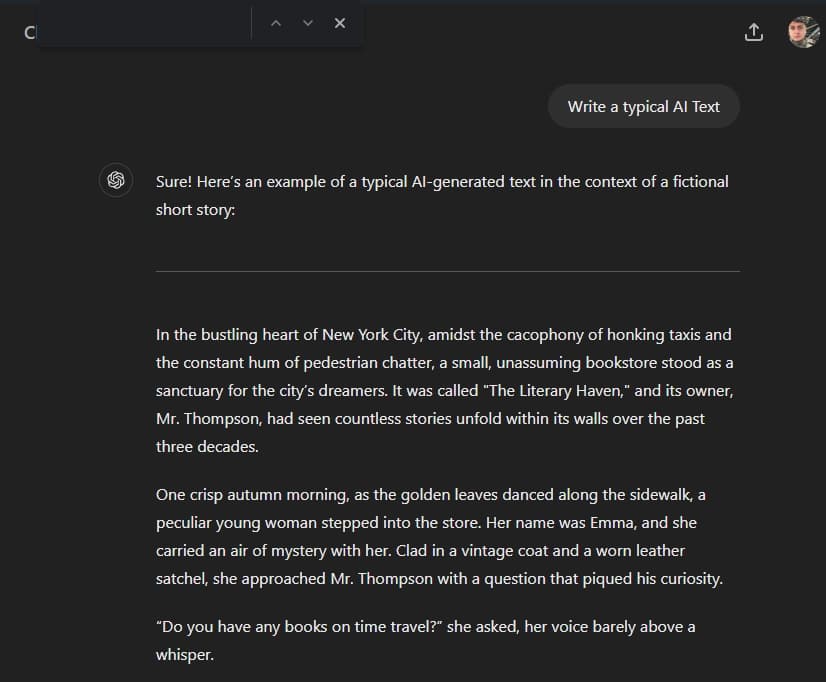
In the era of ChatGPT, AI-generated texts have become increasingly prevalent. Many individuals rely on AI tools to create written content. Here are some common phrases frequently used by GPT models:
There are certain telltale signs and common phrases that can help you recognize AI-generated text. In this blog post, we will explore some of these indicators and provide examples to enhance your ability to identify AI texts.
Often-used Phrases
- “It is important to note”
- “Es ist wichtig zu beachten” (German)
- “In conclusion”
- “Furthermore”
- “Moreover”
- “As mentioned earlier”
- “In other words”
- “On the other hand”
- “Additionally”
- “To illustrate”
- “Considering the fact that”
- “Therefore”
- “Consequently”
- “In summary”
- “To begin with”
- “In essence”
- “From my perspective”
- “Generally speaking”
- “In light of this”
- “Thus”
- “Specifically”
- “On a related note”
- “Despite this”
- “In the context of”
- “With this in mind”
Free Tools to Recognize AI Text
Okay, so you want to know if something was written by AI? There are actually quite a few free tools out there that can help you figure this out. Let me share the ones I've tried and what I think about them.
Online AI Detectors
1. GPTZero
- Website: gptzero.me
- What it does: Analyzes text and gives you a score indicating how likely it is to be AI-generated
- My experience: It's pretty good, but not perfect. Sometimes it flags human-written text as AI, especially if the writing is very polished or formal. I've used it to check my own writing, and it's given me false positives before.
2. Writer.com AI Content Detector
- Website: writer.com/ai-content-detector
- What it does: Another free detector that analyzes text for AI patterns
- My experience: Similar to GPTZero – works okay but not 100% accurate. I'd say it's worth trying if you want a second opinion.
3. Copyleaks AI Content Detector
- Website: copyleaks.com/ai-content-detector
- What it does: Detects AI-generated content and also checks for plagiarism
- My experience: I haven't used this one as much, but I've heard good things about it. The plagiarism check is a nice bonus feature.
4. ZeroGPT
- Website: zerogpt.com
- What it does: Simple AI text detector
- My experience: It's free and easy to use, but like the others, it's not perfect. I'd use it as one tool in your toolkit, not the only one.
Browser Extensions
1. GPTKit
- What it is: A browser extension that can detect AI text
- Where to get it: Chrome Web Store or Firefox Add-ons
- My experience: I haven't tried this one personally, but I've seen it recommended. Browser extensions are convenient because you can check text right on the page you're reading.
2. AI Detector Pro
- What it is: Another browser extension for detecting AI content
- My experience: Similar to GPTKit – convenient but accuracy varies.
Important Note About AI Detectors
Here's the thing – none of these tools are perfect. They can give you false positives (saying human text is AI) and false negatives (missing AI text). The technology is still evolving, and AI models are getting better at mimicking human writing.
My advice? Use these tools as a starting point, but don't rely on them completely. Look for the common phrases I listed above, check the writing style, and use your own judgment. If something feels off, it probably is.
Own Opinion / How I use ChatGPT
Okay, so here's where I get real with you. I use ChatGPT. A lot. But I don't let it write everything for me – and here's why.
My Workflow: Pre-Write, Then AI Assist
I pre-write (is that even a word? I'm not sure, but that's what I call it) all of my texts first. I write the initial draft myself, in my own voice, with my own thoughts and experiences. Then, once I have a rough draft, I ask ChatGPT to help me improve it.
Here's my exact process:
Step 1: Write the First Draft Myself
I sit down and write everything in my own words. I don't think about grammar or perfection at this stage – I just get my thoughts down. This is important because it ensures the core ideas and voice are mine.
Step 2: Ask ChatGPT for Suggestions
Once I have my draft, I'll paste it into ChatGPT and ask something like: "Can you help me improve this? Check for grammar mistakes, suggest better word choices, and make it flow better. But keep my voice and style – don't make it sound too formal or corporate."
Step 3: Review and Edit Manually
ChatGPT gives me suggestions, but I don't accept everything. I read through each suggestion and decide:
- Does this improve the text?
- Does it maintain my voice?
- Does it sound natural?
I probably accept about 60-70% of the suggestions and reject the rest. Sometimes ChatGPT wants to make things too formal or add phrases like "It is important to note" – and I'll delete those immediately.
Step 4: Final Polish
I do a final read-through myself, making sure everything sounds like me. I'll add back some of my casual language, fix anything that sounds too AI-generated, and make sure the personality comes through.
Why I Don't Let AI Write Everything
1. No One Wants to Read AI Texts
Seriously. AI-generated content is boring. It's generic, it lacks personality, and it sounds the same as every other AI-written article. People can tell, and they'll stop reading.
2. My Voice Matters
I'm Livvux. I have my own way of writing, my own experiences, my own personality. That's what makes my content unique. If I let AI write everything, I'd lose that.
3. Authenticity Builds Trust
When people read my blog posts, they're reading MY thoughts, MY experiences, MY voice. That builds trust and connection. If everything was AI-generated, why would anyone care what I have to say?
4. AI Makes Mistakes
ChatGPT isn't perfect. It can give bad advice, make factual errors, or suggest changes that don't make sense. I need to be the one making the final decisions.
Examples of What I Accept vs. Reject
What I Usually Accept:
- Grammar corrections
- Better word choices (when they fit my style)
- Suggestions for clearer sentence structure
- Fixing typos I missed
What I Usually Reject:
- Making things more formal
- Adding phrases like "It is important to note" or "Furthermore"
- Removing my casual language ("lol", "don't judge me", etc.)
- Suggestions that change my meaning
- Anything that makes it sound corporate or generic
The Balance
I think there's a balance. AI is a tool, and like any tool, it depends on how you use it. I use ChatGPT to help me write better, not to write for me. It's like having an editor who catches mistakes and suggests improvements – but I'm still the author.
But: I do not let AI write all of my texts – no one wants to read AI texts.
Practical Tips for Spotting AI Text
Based on my experience, here are some practical tips for recognizing AI-generated content:
1. Look for the Common Phrases
If you see a lot of the phrases I listed at the top of this post, that's a red flag. Especially if they appear multiple times in a short piece of text.
2. Check for Overly Formal Language
AI tends to write in a formal, corporate style. If something sounds like it was written by a committee rather than a person, it might be AI.
3. Look for Lack of Personality
AI text is generic. It doesn't have quirks, personal anecdotes, or unique voice. If everything sounds the same, it might be AI.
4. Check for Perfection
Human writing has imperfections – typos, casual language, personal opinions. If something is too polished and perfect, especially in casual contexts, it might be AI.
5. See if It Answers the Question Directly
AI often gives long, comprehensive answers even when a short answer would work. If something is unnecessarily wordy, it might be AI.
6. Look for Generic Examples
AI tends to use generic, hypothetical examples rather than specific, personal ones. If all the examples feel made up or generic, that's a sign.
7. Check the Flow
AI text can sometimes feel choppy or have weird transitions. Human writing usually flows more naturally, even if it's not perfect.
Side-by-Side Comparison
Let me show you what I mean with a quick example:
AI-Generated Version:
"It is important to note that music production requires dedication and practice. Furthermore, aspiring producers should invest in quality equipment. Additionally, learning music theory can significantly enhance one's skills. In conclusion, success in music production demands commitment and continuous learning."
My Version (Human-Written):
"Okay, so you want to make music? Here's the thing – it takes time. I've been doing this since 2011, and I'm still learning. You don't need the most expensive gear to start (I'm a bedroom producer, remember?), but you do need to practice. A lot. And yeah, learning some music theory helps, but don't let that stop you from just diving in and creating."
See the difference? The AI version is formal, uses those common phrases, and sounds generic. My version has personality, casual language, and personal experience.
Final Thoughts
AI text detection isn't perfect, and neither are the tools. But if you know what to look for – those common phrases, overly formal language, lack of personality – you can usually spot AI-generated content.
And if you're using AI to help with your writing (like I do), just remember: use it as a tool, not a replacement. Keep your voice, share your experiences, and don't be afraid to sound like yourself. That's what makes content worth reading.
What's Your Experience?
Have you tried any of these AI detection tools? What's your take on using ChatGPT or other AI tools for writing? Do you use them, or do you prefer to write everything yourself?
I'd love to hear your thoughts! Drop a comment or reach out on my social media. And if you found this helpful, check out my other posts about AI music production and music production tips.
Questions / Answers
Frequently asked questions
What are the most common phrases that indicate AI-generated text?
Common AI phrases include "It is important to note", "Furthermore", "Moreover", "In conclusion", "Additionally", "To illustrate", "Therefore", "Consequently", "In summary", and "Generally speaking". If you see multiple of these in a short piece of text, it's likely AI-generated.
Are there free tools to detect AI-generated text?
Yes, there are several free tools including GPTZero, Writer.com AI Content Detector, Copyleaks AI Content Detector, and ZeroGPT. However, none of these tools are 100% accurate and can give false positives or negatives.
How accurate are AI detection tools?
AI detection tools are not perfect. They can give false positives (flagging human-written text as AI) and false negatives (missing AI text). The technology is still evolving, and AI models are getting better at mimicking human writing. Use these tools as a starting point, but don't rely on them completely.
What are the telltale signs of AI-generated content?
Signs include overly formal language, lack of personality or personal anecdotes, generic examples, perfection (no typos or casual language), unnecessarily wordy answers, and the presence of common AI phrases. Human writing usually has imperfections, personal voice, and specific examples.
Can I use ChatGPT to help with my writing without it being obvious?
Yes, but you need to use it strategically. Write your first draft yourself, then use ChatGPT for suggestions on grammar, word choices, and flow. Review and edit manually, accepting only 60-70% of suggestions. Reject anything that makes it sound too formal or corporate, and always add back your personal voice.
Why does AI text detection matter?
AI detection matters because AI-generated content can be boring, generic, and lack authenticity. Readers can tell when content is AI-written, which can hurt trust and engagement. For content creators, maintaining your unique voice and authenticity is crucial for building audience trust.
What's the best way to avoid sounding like AI when writing?
Write in your own voice first, use personal anecdotes and experiences, include casual language and imperfections, be specific rather than generic, and don't be afraid to sound like yourself. AI tends to be formal and generic, so embracing your unique voice helps avoid that.
Want more Livvux songs, breakdowns, and producer diary notes?
Follow my YouTube channel for the music and the process
Stay Close to the Sound
Get new Livvux releases, track breakdowns, producer notes, and useful FL Studio or AI-assisted workflow ideas in your inbox.
About the author

Livvux
Lucas is the producer behind Livvux, creating emotional EDM and showing the process behind the sound. Expect FL Studio workflow, AI-assisted ideas, Avicii-inspired music thinking, and personal track breakdowns.
Continue reading
Related posts
Free Livvux producer resources
Download the checklists, guides, and templates behind my emotional EDM workflow.